Language Guide / Samples and Wavetables
Sample
klang::Sample
A sample generator with variable-rate playback.
Assign a populated mono buffer to borrow its samples. Keep the sample storage alive while the player uses it. Playback starts at the first sample and interpolates between samples. By default, it plays once and outputs silence after the end. Set sample.mode = Looped to wrap at the buffer boundaries. You can change the mode during playback.
Example · Play a buffer once
Declare Sample sample; as a member. Here recorded is a buffer already populated with mono audio samples. Attach it during setup. Playback starts at normal speed.
sample = recorded;
Route the next sample to the output in process().
sample >> out;
Choose a playback mode
The default mode is OneShot. Set sample.mode or assign OneShot or Looped directly to change the mode at the current playhead.
sample.mode = Looped;
sample = OneShot;
When attaching a buffer, you can also supply metadata and a mode. The assignment rewinds playback. Omitted metadata or mode keep their current values. Here are three alternative setup forms.
sample = { recorded, Looped };
sample = { recorded, { 440, 44100 } };
sample = { recorded, { 440, 44100 }, OneShot };
Play by rate
Call set(rate) to set the speed multiplier. A rate of 1 plays at normal speed, 0.5 at half speed, and a negative rate plays backwards. To start a one-shot in reverse, use set(rate, time) to seek to a time within the recording. Zero holds the current position. If the recording’s sample rate is known, the player compensates for the host sample rate.
Set the recording metadata
Set info.frequency to the recording’s root frequency in Hz and info.samplerate to its recording rate in samples per second. Both default to zero, which represents an unknown value. Here the recording is an A4 tone sampled at 44.1 kHz.
sample.info = { 440, 44100 };
Use a MIDI note to specify the root pitch when that is how the recording was labelled.
sample.info = { Pitch(60) -> Frequency, 48000 };
Play by target frequency
Use set(Frequency(f)) or set(Hz(f)) to set the target frequency. Hz is an alias for Frequency. With a known root frequency, the speed multiplier is the target divided by the root. A known recording sample rate then converts that multiplier to the appropriate step for the host. Without a root, a known recording rate lets the target specify the number of source samples read per second. With both metadata values zero, the frequency call leaves the current speed in place.
This uses the A4 recording above to play an octave higher. Use the same typed argument in an inline call to set the speed and read a sample in one expression.
sample.set(Hz(880));
Definition at line 4896 of file klang.h.


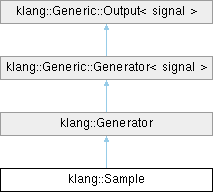
 Inheritance diagram for klang::Sample: